


Page 11 - Cape-Camera-September-2023
P. 11
September 2023                                                                                                                                                                 Cape Camera


           Photoshop Tips
                                Using the High Pass Filter


                                                by Kim Stevens

           The High Pass Filter is a very useful and straightforward tool to use for sharpening an image! The high pass filter
           should be one of the last one’s you use in your workflow. Once your image is edited and you are happy with the
           results, flatten your image before starting to work with the High Pass Filter.


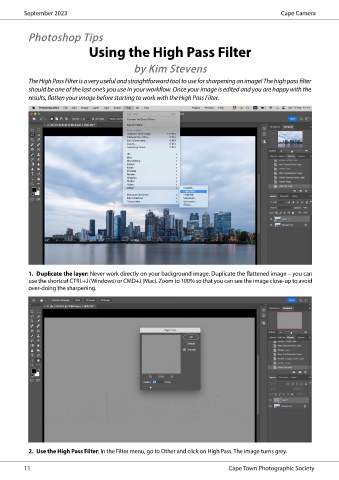
           1.  Duplicate the layer: Never work directly on your background image. Duplicate the flattened image – you can
           use the shortcut CTRL+J (Windows) or CMD+J (Mac). Zoom to 100% so that you can see the image close-up to avoid
           over-doing the sharpening.


           2.  Use the High Pass Filter: In the Filter menu, go to Other and click on High Pass. The image turns grey.


          11                                                                     Cape Town Photographic Society

