


Page 19 - Cape-Camera-Nov-Dec-2024
P. 19
Cape Camera                                                                                                                                           November/December 2024


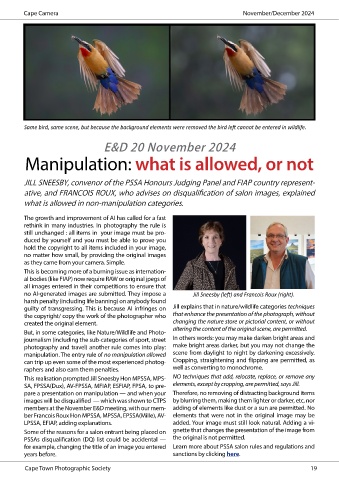
          Same bird, same scene, but because the background elements were removed the bird left cannot be entered in wildlife.


                                     E&D 20 November 2024
          Manipulation: what is allowed, or not


          JILL SNEESBY, convenor of the PSSA Honours Judging Panel and FIAP country represent-

          ative, and FRANCOIS ROUX, who advises on disqualification of salon images, explained
          what is allowed in non-manipulation categories.

          The growth and improvement of AI has called for a fast
          rethink in many industries. In photography the rule is
          still unchanged : all items in  your image must be pro-
          duced by yourself and you must be able to prove you
          hold the copyright to all items included in your image,
          no matter how small, by providing the original images
          as they came from your camera. Simple.
          This is becoming more of a burning issue as internation-
          al bodies (like FIAP) now require RAW or original jpegs of
          all images entered in their competitions to ensure that
          no AI-generated images are submitted. They impose a        Jill Sneesby (left) and Francois Roux (right).
          harsh penalty (including life banning) on anybody found
          guilty of transgressing. This is because AI infringes on   Jill explains that in nature/wildlife categories techniques
          the copyright/ copy the work of the photographer who   that enhance the presentation of the photograph, without
          created the original element.                       changing the nature store or pictorial content, or without
          But, in some categories, like Nature/Wildlife and Photo-  altering the content of the original scene, are permitted.
          journalism (including the sub-categories of sport, street   In others words: you may make darken bright areas and
          photography and travel) another rule comes into play:   make bright areas darker, but you may not change the
          manipulation. The entry rule of no manipulation allowed   scene from daylight to night by darkening excessively.
          can trip up even some of the most experienced photog-  Cropping, straightening and flipping are permitted, as
          raphers and also earn them penalties.               well as converting to monochrome.
          This realisation prompted Jill Sneesby Hon MPSSA, MPS-  NO techniques that add, relocate, replace, or remove any
          SA, FPSSA(Dux), AV-FPSSA, MFIAP, ESFIAP, FPSA, to pre-  elements, except by cropping, are permitted, says Jill.
          pare a presentation on manipulation — and when your   Therefore, no removing of distracting background items
          images will be disqualified  — which was shown to CTPS   by blurring them, making them lighter or darker, etc, nor
          members at the November E&D meeting, with our mem-  adding of elements like dust or a sun are permitted. No
          ber Francois Roux Hon MPSSA, MPSSA, EPSSA(Mille), AV-  elements that were not in the original image may be
          LPSSA, EFIAP, adding explanations.                  added. Your image must still look natural. Adding a vi-
          Some of the reasons for a salon entrant being placed on   gnette that changes the presentation of the image from
          PSSAs disqualification (DQ) list could be accidental —   the original is not permitted.
          for example, changing the title of an image you entered   Learn more about PSSA salon rules and regulations and
          years before.                                       sanctions by clicking here.

          Cape Town Photographic Society                                                                                                                                                                                                                  19

