


Page 25 - Cape-Camera-April-2025
P. 25
Cape Camera                                                                                                                                                                       April 2025


                                                               Step 2


           Step 1


           Step 3                                               Step 4


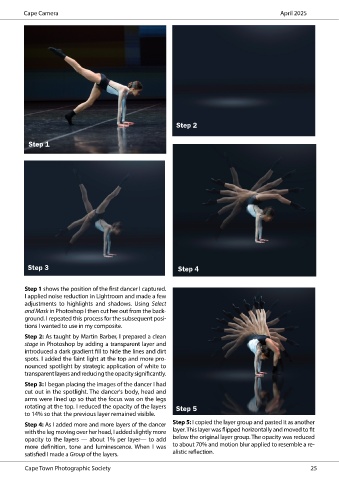
          Step 1 shows the position of the first dancer I captured.
          I applied noise reduction in Lightroom and made a few
          adjustments to highlights and shadows. Using  Select
          and Mask in Photoshop I then cut her out from the back-
          ground. I repeated this process for the subsequent posi-
          tions I wanted to use in my composite.
          Step 2: As taught by Martin Barber, I prepared a clean
          stage in Photoshop by adding a transparent layer and
          introduced a dark gradient fill to hide the lines and dirt
          spots. I added the faint light at the top and more pro-
          nounced spotlight by strategic application of white to
          transparent layers and reducing the opacity significantly.
          Step 3: I began placing the images of the dancer I had
          cut out in the spotlight. The dancer's body, head and
          arms were lined up so that the focus was on the legs
          rotating at the top. I reduced the opacity of the layers   Step 5
          to 14% so that the previous layer remained visible.
          Step 4: As I added more and more layers of the dancer   Step 5: I copied the layer group and pasted it as another
          with the leg moving over her head, I added slightly more   layer. This layer was flipped horizontally and moved to fit
          opacity to the layers — about 1% per layer— to add   below the original layer group. The opacity was reduced
          more definition, tone and luminescence.  When I was   to about 70% and motion blur applied to resemble a re-
          satisfied I made a Group of the layers.             alistic reflection.

          Cape Town Photographic Society                                                                                                                                                                                                                  25

